Title here
Summary here
Suppose you are working with this HTML and CSS.
<button class="branding">Hello, Specificity!</button>.branding {
color: blue;
}
button {
color: red;
}Two different rules target the same element. One tries to color the button red and the other tries to color it blue. Which color does the button end up?
The button will be blue. This happens because class selectors have a higher priority than tag selectors. CSS uses an algorithm called specificity to decide which styles win when they compete.
Every selector gets a score based on the types of selectors inside it. Think of it like points. The selector with the highest total score wins the conflict.
In a real project, the goal is keeping specificity scores low. If you make selectors too specific, it becomes very hard to override them later when you need to make changes. Only make your rules as specific as they need to be.
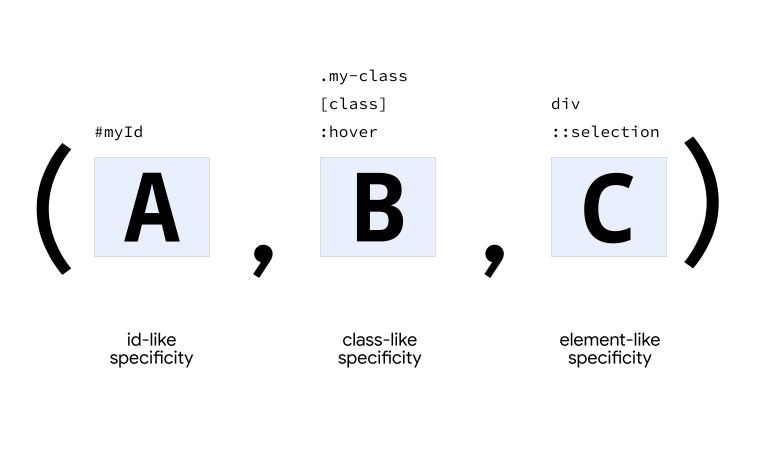
Specificity is written as three numbers like (A,B,C).
For example, a score might be (1,0,2).
To compare scores, you look at the three numbers from left to right. First you compare the A values. The selector with the larger A value is more specific.
If the A values are tied, you look at the B values. The selector with the larger B value wins.
If the B values are also tied, you look at the C values. The selector with the larger C value wins. If all three numbers are equal, the selectors are tied.
For example, (1,0,0) wins over (0,4,3) because the first number is larger.
It does not matter how large the other numbers are.
The left column always wins ties.
Every selector starts with a score of (0,0,0).
Depending on the selectors you write, the browser adds points to A, B, or C.
The universal selector * is a wildcard matching any element.
It adds nothing to the score, leaving it at (0,0,0).
* {
  color: red;
}An element tag or pseudo-element selector adds a point to the C column.
The following examples have a score of (0,0,1).
div {
  color: red;
}::selection {
color: red;
}A class, pseudo-class, or attribute selector adds a point to the B column.
The following examples have a score of (0,1,0).
.my-class {
  color: red;
}:hover {
color: red;
}[href='#'] {
color: red;
}An ID selector adds a point to the A column.
This only applies if you use the actual ID symbol.
Using an attribute selector like [id="myID"] counts as a regular attribute selector and adds to B instead of A.
This example has a score of (1,0,0).
#myID {
  color: red;
}Some pseudo-classes do not add any specificity themselves, but the selectors inside them do count.
For example, the :not() pseudo-class adds nothing, but any selectors you put inside its parentheses are counted.
div:not(.my-class) {
  color: red;
}
Here, the div adds 1 to C and .my-class adds 1 to B.
The total score is (0,1,1).
The :is() pseudo-class also adds no score itself.
Instead, it takes the score of its most specific option inside the parentheses.
:is(h1, h2, h3) {
  color: blue;
}
This rule has a score of (0,0,1) because all options are simple element tags.
If you add an ID to the options, the score of the whole selector jumps to (1,0,0).
:is(h1, h2, h3, #my-heading) {
  color: blue;
}
The :where() pseudo-class behaves differently.
It always has a score of (0,0,0) regardless of what you put inside it.
:where(h1, h2, h3, #my-heading) {
  color: blue;
}
This is very helpful for writing default styles.
Because :where() has a zero score, you can override its styles easily with any standard selector later.
:where(#my-content) {
   color: red;
}

p {
   color: blue;
}
Even though :where() contains an ID, its score remains (0,0,0).
The basic paragraph selector overrides it and makes the text blue.
Some common factors do not change your specificity score.
Applying styles directly on the HTML element using the style attribute does not change your specificity score.
This is because inline styles are evaluated in a completely separate step of the cascade before specificity is checked.
<div style="color: red"></div>To override inline styles from your stylesheet, you must use the !important flag.
Adding !important to a declaration does not change its specificity score.
Instead, it moves the declaration into a different origin bucket in the cascade.
.my-class {
  color: red !important;
  color: white;
}
If you have two competing rules that both use !important, the browser will look at specificity scores to decide the tie.
.branding {
  color: blue !important;
}

button {
  color: red !important;
}When you chain selectors together, their scores add up. Say you have this HTML.
<a class="my-class another-class" href="#">A link</a>A simple element selector has a score of (0,0,1).
a {
  color: red;
}
Adding one class increases the score to (0,1,1).
a.my-class {
  color: green;
}
Adding the second class increases it to (0,2,1).
a.my-class.another-class {
  color: rebeccapurple;
}
Adding the attribute selector increases it to (0,3,1).
a.my-class.another-class[href] {
  color: goldenrod;
}
Adding the :hover state makes the final score (0,4,1).
a.my-class.another-class[href]:hover {
  color: lightgrey;
}Say you have this CSS.
.my-button {
  background: blue;
}

button[onclick] {
  background: grey;
}
And this HTML.
<button class="my-button" onclick="alert('hello')">Click me</button>The button background will be grey.
The second selector has one type selector and one attribute selector, giving it a score of (0,1,1).
The first selector only has one class selector, giving it a score of (0,1,0).
If you want to boost the score of the class selector without changing your HTML, you can repeat the class name.
.my-button.my-button {
  background: blue;
}

button[onclick] {
  background: grey;
}
Now the score is (0,2,0) which wins over (0,1,1).
[!CAUTION] If you find yourself repeating classes to force overrides, your selectors are probably too complex. Try refactoring your CSS to reduce specificity scores overall.
If two selectors have the exact same specificity score, the cascade falls back to the order of appearance. The rule written last in the stylesheet will win.
.my-button {
  background: blue;
}

[onclick] {
  background: grey;
}
Both selectors have a score of (0,1,0).
The button background will be grey because that rule comes last.
If you swap their order in your stylesheet, the button will become blue.
[onclick] {
  background: grey;
}

.my-button {
  background: blue;
}Adapted from Learn CSS © Google and contributors, licensed under CC BY 4.0 (prose) and Apache 2.0 (code samples).