Title here
Summary here
Say you have an article and you want the first letter to be a much bigger drop cap. How do you do that?
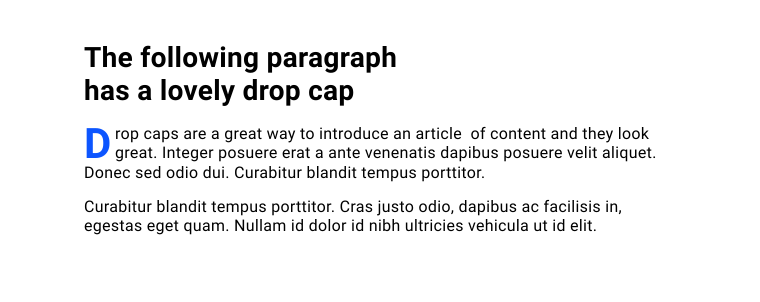
In CSS, you can use the ::first-letter pseudo-element to make this kind of design detail.
p::first-letter {
  color: blue;
  float: left;
  font-size: 2.6em;
  font-weight: bold;
  line-height: 1;
  margin-inline-end: 0.2rem;
}
A pseudo-element is like adding or targeting an extra element without having to add more HTML.
This example, using ::first-letter, is one of many pseudo-elements.
They have a range of jobs.
In this lesson you’re going to learn which pseudo-elements are available and how you can use them.
::before and ::afterBoth the ::before and ::after pseudo-elements create a child element inside an element, but only if you set a content property.
.my-element::before {
    content: "";
}

.my-element::after {
    content: "";
}
The content can be any string, even an empty one.
Just remember that anything other than an empty string will likely be read out by a screen reader.
You can add an image url, which inserts an image at its original size, so you won’t be able to resize it.
You can also insert a counter.
[!IMPORTANT] Key term. You can create a named counter and then increase it, based on its position in the document flow. There are all sorts of places where counters can be really useful, such as automatically numbering an outline.
Once a ::before or ::after element has been created, you can style it however you want with no limits.
You can only add a ::before or ::after element to an element that will accept child elements (elements with a document tree).
So elements such as <img />, <video>, and <input> won’t work.
[!TIP]
input[type="checkbox"]is an exception. It’s allowed to have pseudo-element children.
::first-letterWe met this pseudo-element at the start of the lesson.
It’s worth knowing that not all CSS properties can be used when targeting ::first-letter.
The properties you can use are listed here.
colorbackground properties (such as background-image)border properties (such as border-color)floatfont properties (such as font-size and font-weight)text-decoration and word-spacing)p::first-letter {
color: goldenrod;
font-weight: bold;
}[!NOTE] You can only use
:first-letteron block containers. So it won’t work if you try to add it to an element that hasdisplay: inline.
::first-lineThe ::first-line pseudo-element lets you style just the first line of text.
It only works if the element with ::first-line applied has a display value of block, inline-block, list-item, table-caption, or table-cell.
p::first-line {
  color: goldenrod;
  font-weight: bold;
}
Like the ::first-letter pseudo-element, there’s only a small set of CSS properties you can use.
colorbackground propertiesfont propertiestext properties::backdropSay you have an element that is shown in full screen mode, such as a <dialog> or a <video>.
You can style the backdrop, which is the space between the element and the rest of the page, with the ::backdrop pseudo-element.
video::backdrop {
  background-color: goldenrod;
}::markerThe ::marker pseudo-element lets you style the bullet or number for a list item, or the arrow of a <summary> element.
::marker {
  color: hotpink;
}

ul ::marker {
  font-size: 1.5em;
}

ol ::marker {
  font-size: 1.1em;
}

summary::marker {
  content: '\002B'' '; /* Plus symbol with space */
}

details[open] summary::marker {
  content: '\2212'' '; /* Minus symbol with space */
}
Only a small set of CSS properties work with ::marker.
colorcontentwhite-spacefont propertiesanimation and transition propertiesYou can change the marker symbol using the content property.
You can use this to set a plus and a minus symbol for the closed and open states of a <summary> element, for example.
::selectionThe ::selection pseudo-element lets you style how selected text looks.
::selection {
  background: green;
  color: white;
}
This pseudo-element can be used to style all selected text, as in the demo above. It can also be used along with other selectors for a more specific selection style.
p:nth-of-type(2)::selection {
  background: darkblue;
  color: yellow;
}
As with other pseudo-elements, only a small set of CSS properties are allowed.
colorbackground-color, but not background-imagetext properties::placeholderYou can add a helper hint to form elements, such as an <input> with a placeholder attribute.
The ::placeholder pseudo-element lets you style that text.
input::placeholder {
  color: darkcyan;
}
The ::placeholder pseudo-element only supports a small set of CSS rules.
colorbackground propertiesfont propertiestext properties[!NOTE] A
placeholderis not a<label>and shouldn’t be used in place of a<label>. Form elements must be labelled or they will be hard to use for some people.
::cueLast in this tour of pseudo-elements is the ::cue pseudo-element.
This lets you style the WebVTT cues, which are the captions of a <video> element.
You can also pass a selector into ::cue, which lets you style specific elements inside a caption.
video::cue {
  color: yellow;
}

video::cue(b) {
  color: red;
}

video::cue(i) {
  color: lightpink;
}
Adapted from Learn CSS © Google and contributors, licensed under CC BY 4.0 (prose) and Apache 2.0 (code samples).