Title here
Summary here
In the introduction to this series it says “HTML elements are the nodes that make up the Document Object Model.” We’ve discussed the type of element nodes. In this section we discuss element APIs that enable querying those nodes.
The DOM is an API for accessing and manipulating documents. The DOM is the tree of all the nodes in the document. Some nodes can have children, others can’t. The tree includes elements, along with their attributes, and text nodes.
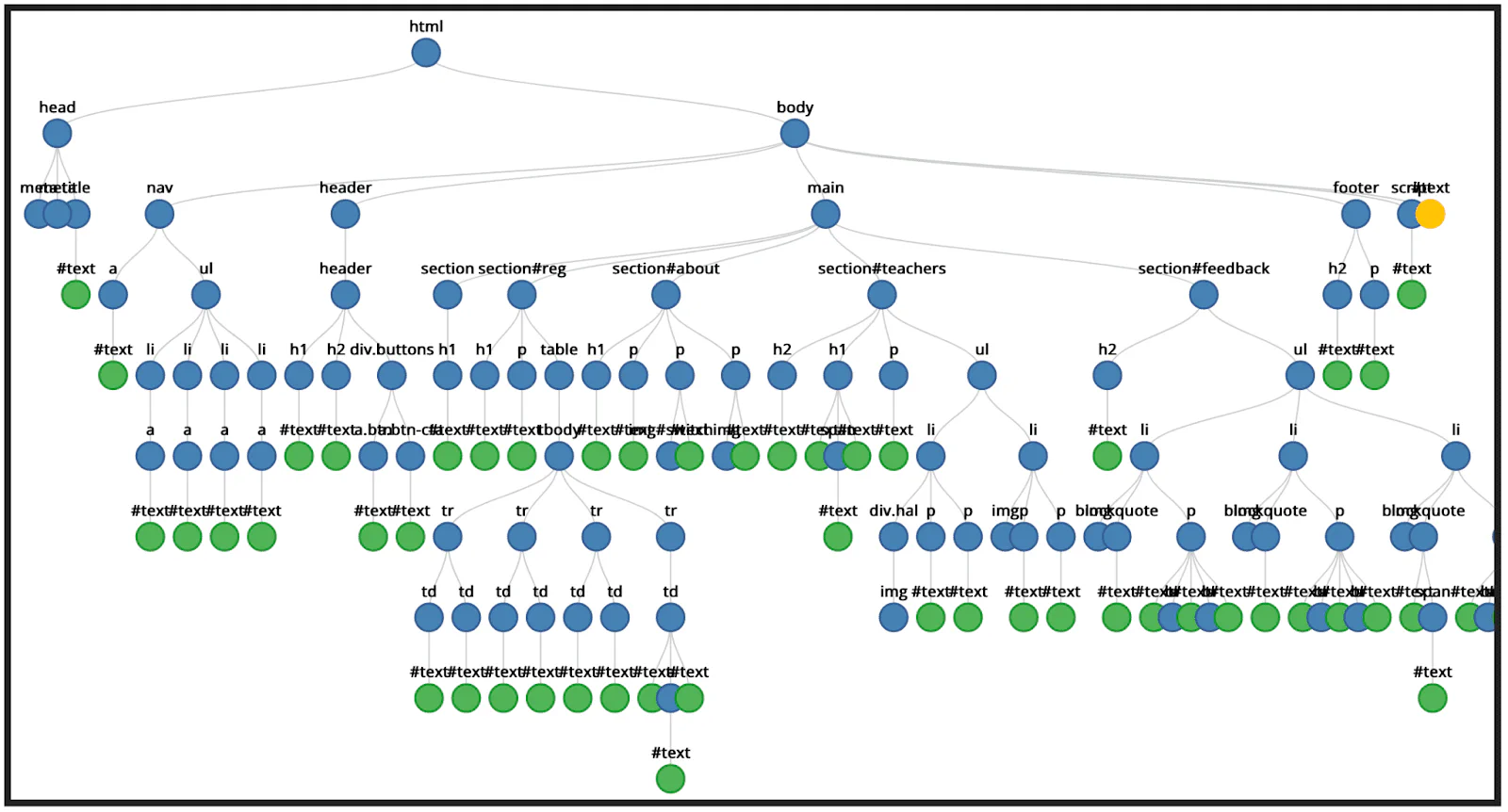
Browser tools don’t provide tree visualizations like the one above, but you can see the nodes in the element inspector.
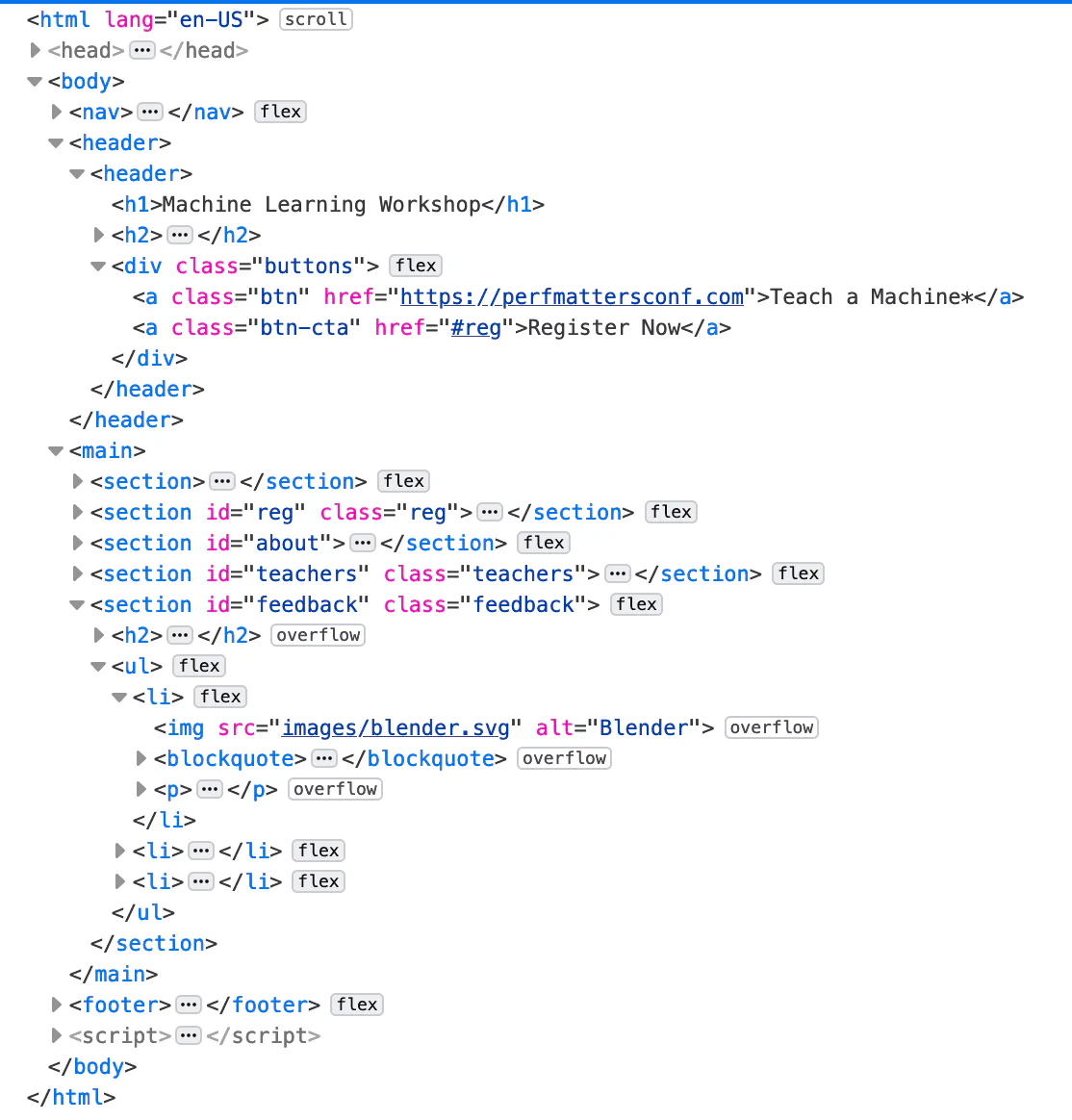
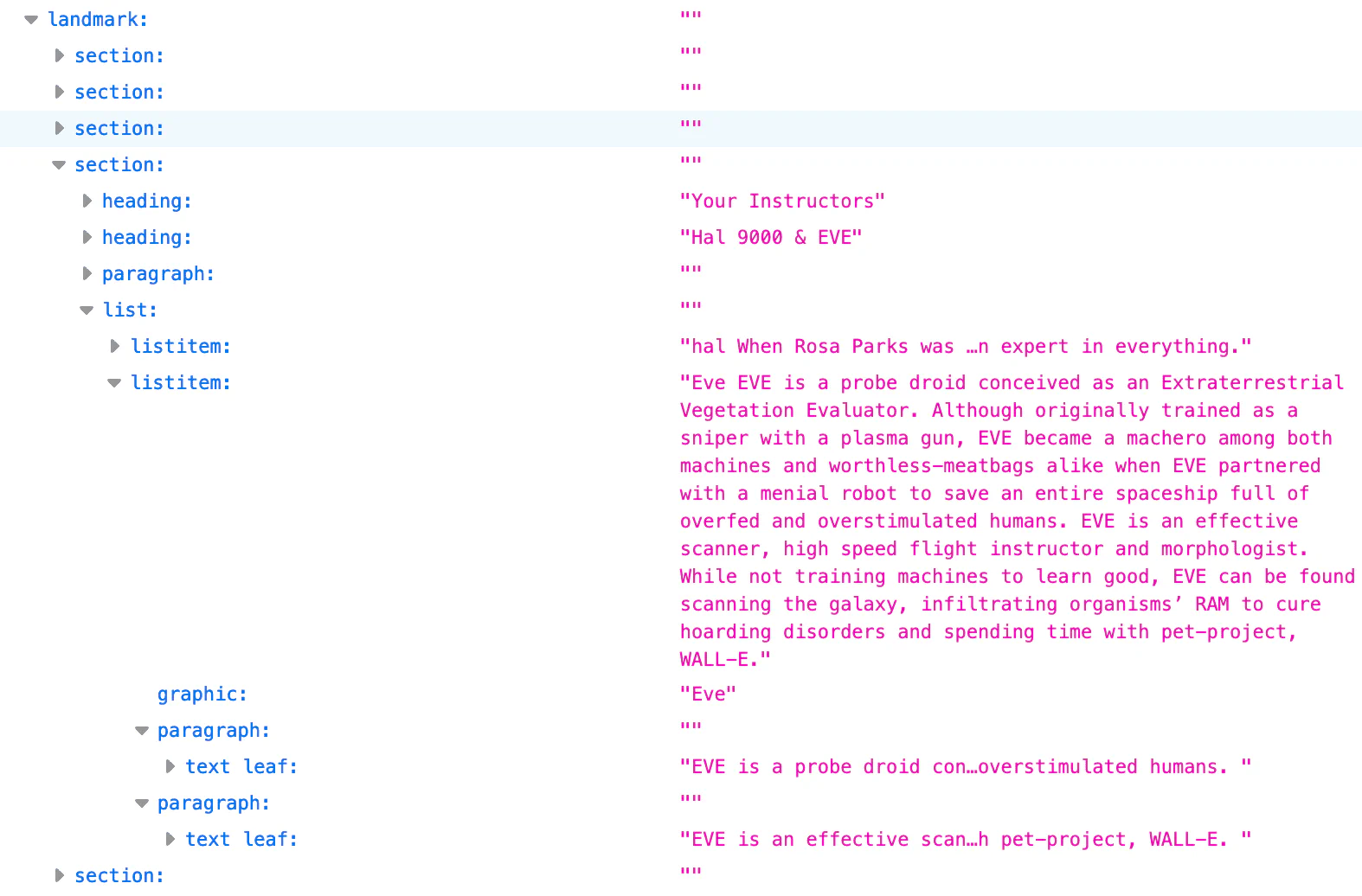
The tree representation that can be inspected in browser developer tools is the accessibility tree. The AOM is based off the DOM; similarly, the accessibility tree contains objects representing all the markup elements, attributes, and text nodes:
The middle letter of DOM is “object.” Just like the person or car object
example from most intro to object-oriented programming classes, every node in
the document tree is an object that can be manipulated with JavaScript.
The browser provides numerous APIs providing natively supported methods, events,
and property querying and updating. Element nodes contain information about all
the attributes set on the element. You can use HTML interfaces to access
information about an element’s attributes. For example, we can use
HTMLImageElement.alt
get the alt attributes of all the images:
let allImages = document.querySelectorAll("img");
allImages.forEach((imageInstance) => {
  console.log(imageInstance.alt);
});
HTML interfaces provide more than just access to an element’s attributes; you
can access a lot more information. We can find the read-only
HTMLElement.offsetHeight
to get the height of each section in our page, relative to the layout.
let allSections = document.querySelectorAll("section");
allSections.forEach((sectionInstance) => {
  console.log(sectionInstance.offsetHeight);
});
If the user changes their device orientation or otherwise changes the width of
the viewport, the height of each <section> will change and the DOM properties
will automatically update with it.
The HTML interface APIs is not limited to accessing attribute values. The DOM
provides insight into the current state of the UI. HTML APIs can access all of
that information. You can access the length of a video, where a view is in the
current playback, and if the video (or audio) has finished playing with
HTMLMediaElement.duration,
HTMLMediaElement.currentTime,
and
HTMLMediaElement.ended
respectively.
Most HTML element we’ve covered thus far in this series and have yet to cover,
other than some
sectioning elements, have an
associated DOM interface. The base interface for all elements is aptly named
Element. The
HTMLElement inherits
from Element and all HTML element-specific interfaces inherit from it. Some
element-specific interfaces are implemented by multiple, similar elements.
The interfaces include:
HTMLAnchorElement -
<a>HTMLAreaElement -
<area>HTMLAudioElement -
<audio>HTMLBaseElement -
<base>HTMLButtonElement -
<button>HTMLCanvasElement -
<canvas>HTMLDataElement -
<data>HTMLDataListElement -
<datalist>HTMLDetailsElement -
<details>HTMLDialogElement -
<dialog>HTMLEmbedElement -
<embed>HTMLFieldSetElement -
<fieldset>HTMLFormElement -
<form>HTMLHtmlElement -
<html>HTMLIFrameElement -
<iframe>HTMLImageElement -
<img>HTMLInputElement -
<input>HTMLLabelElement -
<label>HTMLLegendElement -
<legend>HTMLLIElement -
<li>HTMLLinkElement -
<link>HTMLMapElement -
<map>HTMLMediaElement -
<audio>, <video>HTMLMenuElement -
<menu>HTMLMetaElement -
<meta>HTMLMeterElement -
<meter>HTMLModElement -
<ins>, <del>HTMLObjectElement -
<object>HTMLOListElement -
<ol>HTMLOptGroupElement-
<optgroup>HTMLOptionElement -
<option>HTMLOutputElement -
<output>HTMLPictureElement -
<picture>HTMLProgressElement -
<progress>HTMLQuoteElement -
<q>, <blockquote>, <cite>HTMLScriptElement -
<script>HTMLSelectElement -
<select>HTMLSlotElement -
<slot>HTMLSourceElement -
<source>HTMLStyleElement -
<style>HTMLTableCellElement -
<td>, <th>HTMLTableColElement -
<col>, <colgroup>HTMLTableElement -
<table>HTMLTableRowElement -
<tr>HTMLTableSectionElement -
<thead>, <tbody>, <tfoot>HTMLTemplateElement -
<template>HTMLTextAreaElement -
<textarea>HTMLTimeElement -
<time>HTMLTitleElement -
<title>HTMLTrackElement -
<track>HTMLVideoElement -
<video>The naming convention is “HTML” followed by an element or grouping of elements in upper camel case, followed by “Element”, but the element or grouping of elements part follows no exact pattern. Don’t worry. There is no need to memorize these. It’s just important to know that they exist so you can look them up when you need to.
If you have a collection of elements, there are also come collection interfaces.
For example, the
HTMLCollection.namedItem()
method returns the first element in the collection whose id or name
attribute matches the parameter, or null if no element matches.
Over 30 elements don’t have an associated DOM interface other than HTMLElement
including <address>, <article>, <section>, <nav>, <header>,
<footer>, <aside>, and <hgroup>. Many elements that don’t support any
non-deprecated, non-global attributes have element specific interfaces, like
HTMLPElement (the <p> element) and
HTMLUnknownElement
( <😃> or any other elements that are not defined), but those interfaces don’t
implement any additional properties or methods on top of the properties and
methods inherited from HTMLElement, and are not listed above.
If an interface has the same method or property name as an interface it
inherits, the inheriting method or property overwrites the inherited one. In
other words, parent methods and properties override children. When we accessed
the alt and offsetHeight properties in
HTML Element APIs with
imageInstance.alt and sectionInstance.offsetHeight respectively, the code
didn’t identify which API was being accessed. Generally, as with these two
examples, this isn’t an issue.
However, there are some instances where redundancy can cause a problem. For
example,
HTMLCollection.length
is read-only, while the inheriting interface,
HTMLOptionsCollection,
has a length property (returned only by the options property of <select>)
with read and write access. HTMLOptionsCollection can be used to set
collection size.
There are additional interfaces that enable manipulating the branch locations of
DOM nodes. The
EventTarget
interface, which provides us with
addEventListener()
and
removeEventListener(),
is inherited by the Node
and Window interfaces. In
turn, the Element, Document, and DocumentFragment (which we saw in
custom elements) interfaces inherit from
Node, and the HTMLElement interface inherits from Element.
node interfaceEvery type of DOM node is represented by an interface based on
Node, which provides
information and methods as elements relate to the DOM tree. The Node interface
enables querying and adding nodes to the node tree.
Douglas Crockford’s famous “walk the DOM” function, makes use of Node’s
firstChild and
the nextSibling
properties.
const walk_the_DOM = function walk(node, callback) {
  callback(node);
  node = node.firstChild;
  while (node) {
    walk(node, callback);
    node = node.nextSibling;
  }
};
We used Node’s
appendChild()
and cloneNode()
methods in defining custom elements. The
Node interface provides many useful properties and methods for querying and
manipulating the DOM.
customElements.define(
  "star-rating",
  class extends HTMLElement {
    constructor() {
      super(); // Always call super first in constructor
      const starRating = document.getElementById(
        "star-rating-template",
      ).content;
      const shadowRoot = this.attachShadow({
        mode: "open",
      });
      shadowRoot.appendChild(starRating.cloneNode(true));
    }
  },
);
The
attachShadow()
method is a method of the Element interface. There is also a
shadowRoot interface
for the
Shadow DOM API
rendered separately from a document’s main DOM tree.
Document and HTMLDocument interfacesThe Document interface
inherits from Node. It represents the web page loaded in the browser, whether
the document is HTML, SVG, XML, MathML, or other. The Document interface also
inherits from the HTMLDocument interface.
The document enables quick access to node types and the ability to create
collections of specific element types, such as document.body and
document.styleSheets. The HTMLDocument enables accessing information relevant
to the document that are not found in HTML nodes, such as the
Document.location,
Document.lastModified,
and
Document.Cookie.
Several APIs are available based on features surfaced through the document
interface, including the
Drag and Drop API
and the
FullScreen API.
Both inherit from Element.
Window interfaceThe Window interface includes globally available items beyond the DOM that can be used to manipulate the DOM. Window provides functions, namespaces, objects, and constructors documented in MDN’s JavaScript and DOM References.
The Window interface is the API for the object containing the document. The
global window object is the window in which the script is running. Every
browser tab contains its own Window object. The Window interface can query the
contents of the tab as well as the overall window and device. For example, the
resizeTo()
method can be used to resize the browser window, the
devicePixelRatio
property provides access to the device display pixels. When accessing
information about the tab the content is in rather than the DOM tree the tab
displays, the window is likely the interface you’re looking for.
Several APIs are available based on features surfaced through the Window interface, including the Web Workers and IndexedDB APIs.
Learn HTML © 2022 by Estelle Weyl, CC BY 4.0.